How Lovable Protects User Data in Connected Production Apps
By Lovable Student · Published 29 July 2026 · Updated 28 Sept 2026
Lovable has published a detailed explanation of how it secures production applications that use connected third-party data.
- news
- Connectors
- OAuth
- Security
- User Data
- Permissions
Summary
Lovable has published a detailed explanation of how it secures production applications that use connected third-party data.
The model is designed around per-user access. Each user connects their own account, and the Lovable app inherits the permissions that person already has in the source system. If a user cannot access a record in the original service, the app should not gain access to it on their behalf.
Administrators choose which connectors are available, their scopes, which users can access them, and whether offline access is allowed. Lovable distinguishes browser-only, session-bound access from offline access. Session-bound access acts on a user's data only while that person is actively signed in. Offline access allows background agents and scheduled workflows to act when the user is away and must be deliberately enabled by an administrator for each connector.
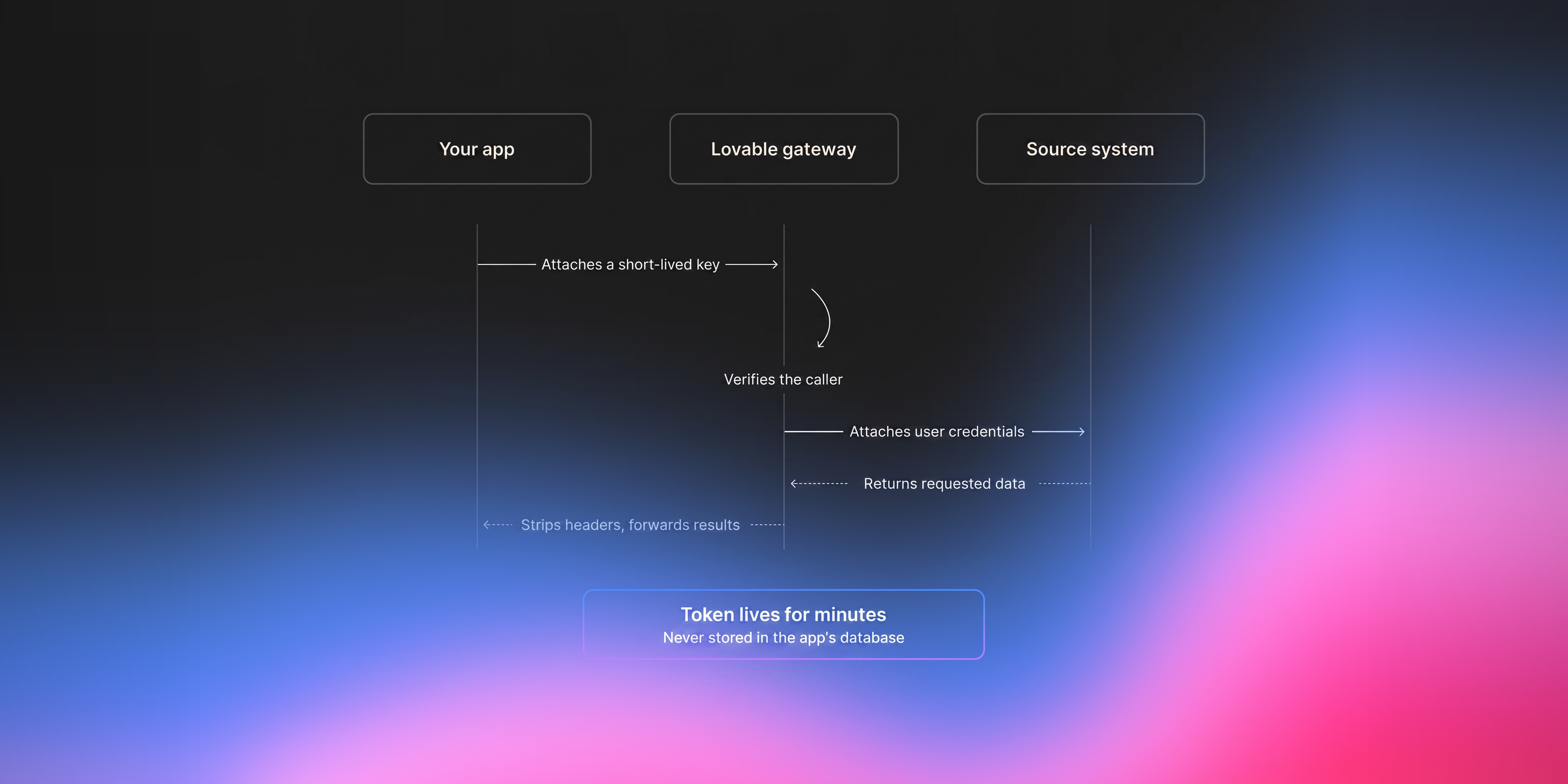
Lovable says the application itself never receives the user's real credential. Credentials are stored encrypted on Lovable's server side. The app sends an intent and a short-lived key tied to the signed-in user to Lovable's connector gateway, which attaches the real credential only while forwarding the approved request.
Connectors are also pinned to a specific destination. Lovable says the gateway reconstructs requests against the registered host before attaching credentials, helping prevent a malicious or misdirected request from sending a token to an attacker-controlled server.
The article also stresses data-storage choices. If third-party data is copied into a Lovable database, the source system's permission model no longer automatically follows that copy. Lovable recommends avoiding persistence where practical for simple sensitive apps, or storing identifiers and non-sensitive generated data rather than copying sensitive fields when that meets the product's needs.
Original Source
Read the original announcement
What This Means for Lovable Users
This article is particularly important for builders creating applications on top of Google Workspace, CRM systems, messaging tools, data warehouses, or other user-connected services.
The main security benefit is that the app does not need to store every user's OAuth token itself. Lovable's connector gateway handles credentials and forwards requests using the identity of the person making them.
However, builders still make important security decisions. Connector scopes should be minimized, offline access should only be enabled when the product genuinely needs background activity, and copying connected data into the app's own database should be a deliberate architectural choice.
The storage warning is easy to miss. Source-system permissions can be enforced when data is requested live from that system. Once the same information is copied elsewhere, the builder becomes responsible for correctly securing the new copy.
What This Means for Lovable and the Broader Community
Per-user connectors make it possible to build software that operates across existing business systems without collapsing everyone onto a shared credential.
That is important for enterprise use because source systems often contain years of carefully configured permissions. Preserving those permissions reduces the need to recreate complex access rules inside every new app.
The architecture also reflects a broader security principle for agentic software: applications should receive the least credential power necessary, for the shortest practical time, and credentials should not be exposed to generated application code when an intermediary can safely perform the authorized request.
Ways You Could Use This
Build a Per-User CRM Dashboard
Let each employee see CRM records according to their existing source-system access.
Build this dashboard using the app-user connector and each person's existing CRM permissions. Prefer live access for sensitive fields and do not copy them into our database unless there is a documented product need.
Create a Scheduled Brief Carefully
Offline access can support background workflows but increases standing access.
Design a daily briefing workflow using offline access. Before enabling it, list the minimum connector scopes required, what data is read, what is stored, how long it is retained, and how users revoke access.
Minimize Sensitive Data Storage
Store identifiers instead of full records where possible.
Review this integration and classify every third-party field as live-only, identifier-only, non-sensitive persisted data, or sensitive persisted data. Default to storing less.
Review Connector Scope
Avoid requesting broad permissions for a narrow workflow.
Audit the OAuth scopes requested by this app and map each scope to a specific user-facing feature. Flag any scope that is broader than the functionality requires.
If you need help implementing, reviewing, troubleshooting, or planning a production Lovable project related to this update, expert Lovable assistance is available through PromptSites.com.
Should Existing Lovable Users Do Anything?
If you are building with app-user connectors, review three things before production: connector scope, whether offline access is genuinely necessary, and what third-party data is persisted in your own database.
For sensitive applications, prefer session-bound access and minimal storage unless the product requires otherwise. If you do persist connected data, design and test authorization for that copy independently because upstream permissions do not automatically follow it.
Key Takeaway
Lovable's connector architecture is designed so generated apps do not directly hold users' real credentials and can act using each person's existing permissions. The builder still controls critical architectural choices, especially scope, offline access, and whether connected data is copied into a new database.
Sources
Was this post helpful?
